Nextdoor for Established HVAC Companies: What's Worth Doing and What to Skip
An honest accounting of Nextdoor's features for a $1M+ HVAC operator — what moves the needle, what's a vanity badge, and what's a waste of your team's hours.
Most established HVAC owners we talk to have a Nextdoor business page they haven't logged into in six months. Some are running sponsored posts on autopilot. A few have a "Neighborhood Favorite" badge from 2023 and aren't sure what it's worth. Almost none can tell you, with confidence, which of these is actually generating jobs.
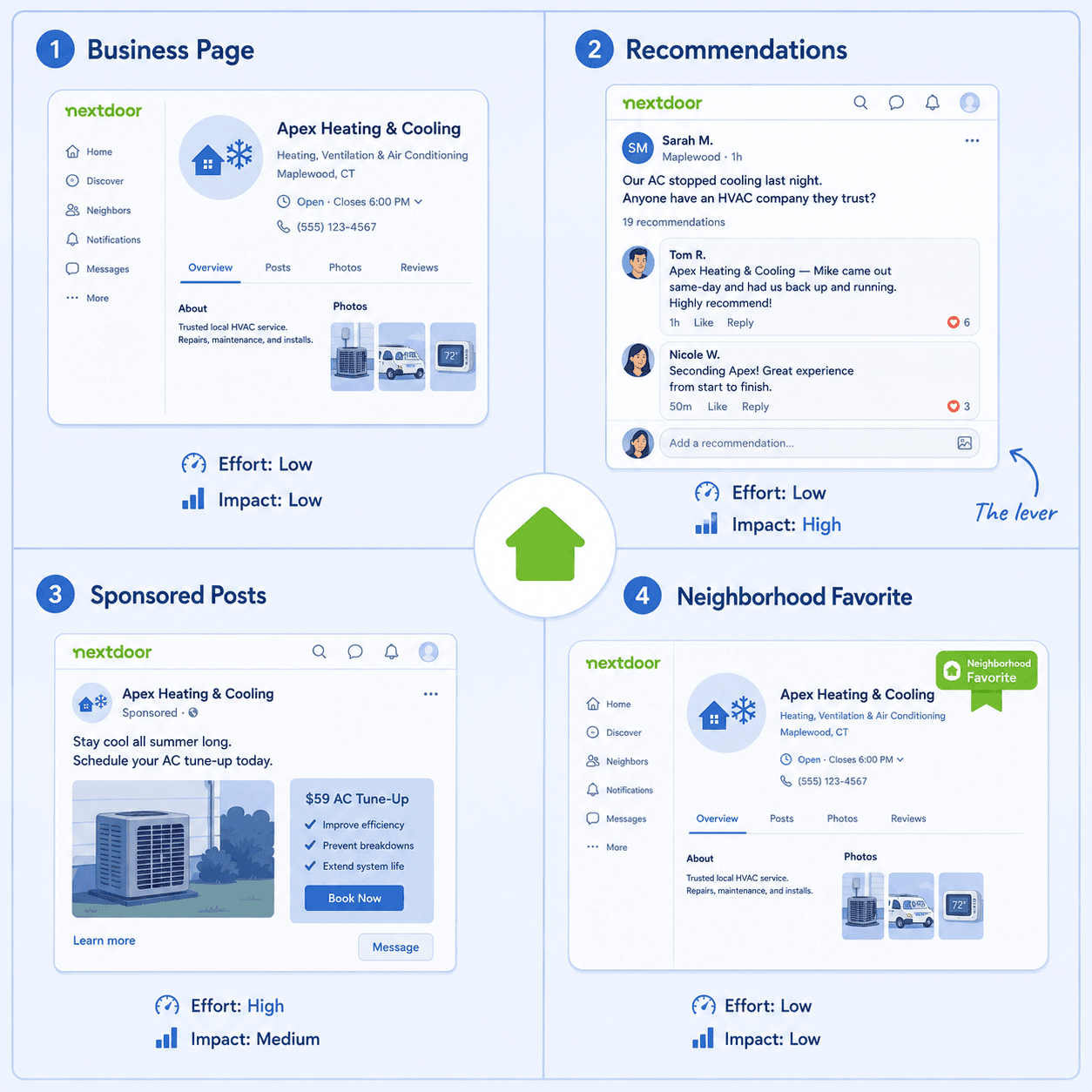
This post is an honest accounting. Nextdoor has four distinct surfaces an HVAC operator can engage with. Three of them are mostly distractions. One is where the real game is.
The business page
What it is: Your verified business profile on Nextdoor, with hours, service area, photos, and the ability to be tagged in threads.
What it's worth: Necessary, not a lever. You need one so that when someone types your business name in a thread, it auto-links and shows the verified badge. That's it. The page itself doesn't generate traffic; nobody is browsing Nextdoor business pages the way they browse Google Maps results.
What to do: Set it up once, completely. Service area, hours, three or four good photos (not equipment installs — your team, your trucks, your office). Then stop. Don't post weekly "tips," don't share blog content, don't try to make it an active channel. It isn't one, and the activity won't move what matters.
Time budget: 90 minutes once, plus an hour a year to refresh photos.
Recommendations (the thread surface)
What it is: When a Nextdoor member asks for an HVAC recommendation, the thread that forms underneath their post. Neighbors comment with company names. The original poster picks one.
What it's worth: Everything. This is the surface that decides jobs. The dynamics — first-hour mentions, cross-thread compounding, the same two or three companies showing up everywhere — are the entire reason FirstThread exists as a company. We've written about this in the first-hour post and the cross-thread post.
What to do: Not what you think. The instinct is to monitor for these threads and have your team comment on them. That backfires for two reasons. First, Nextdoor's moderation flags business accounts that comment on recommendation threads, and your page can be deprioritized or removed. Second, even when the comment posts, neighbors discount it heavily — everyone reading the thread can tell the difference between an unprompted neighbor vouching for you and you vouching for yourself.
The real work is upstream: getting your past customers to be the ones who type your name. That's a job-wrap-up and recall problem (see the happy-customer post), not a Nextdoor-comment-strategy problem.
Time budget: Zero on the platform itself. The leverage is in how your team finishes jobs in the neighborhoods you've served, which is operational, not marketing.
Sponsored posts
What it is: Paid placement that puts your post or business in front of Nextdoor members in a defined area.
What it's worth: Generally lower-ROI than the same dollars spent on Local Services Ads or even Google Search ads, for a specific reason — Nextdoor's audience is in recommendation-discovery mode, not vendor-shopping mode. They're scrolling neighborhood updates, not actively looking for an HVAC company. Sponsored posts in that context get scrolled past, even when the targeting is accurate.
The exception is high-intent moments — a sponsored post that lands during a heat wave when half the neighborhood's AC is struggling will perform better than one in October. But "buy ad space whenever it's hot" isn't a planning model anyone can run reliably.
What to do: Run it as a contained experiment for one or two months if you have the budget and want firsthand data on what it does in your specific metro. Don't make it a recurring line item unless the math shows up.
Time budget: A few hours to set up, then ongoing only if the math justifies it.
The Neighborhood Favorite badge
What it is: A badge Nextdoor awards annually to businesses that receive a threshold of recommendations from neighbors. The badge appears on the business page and in some search results.
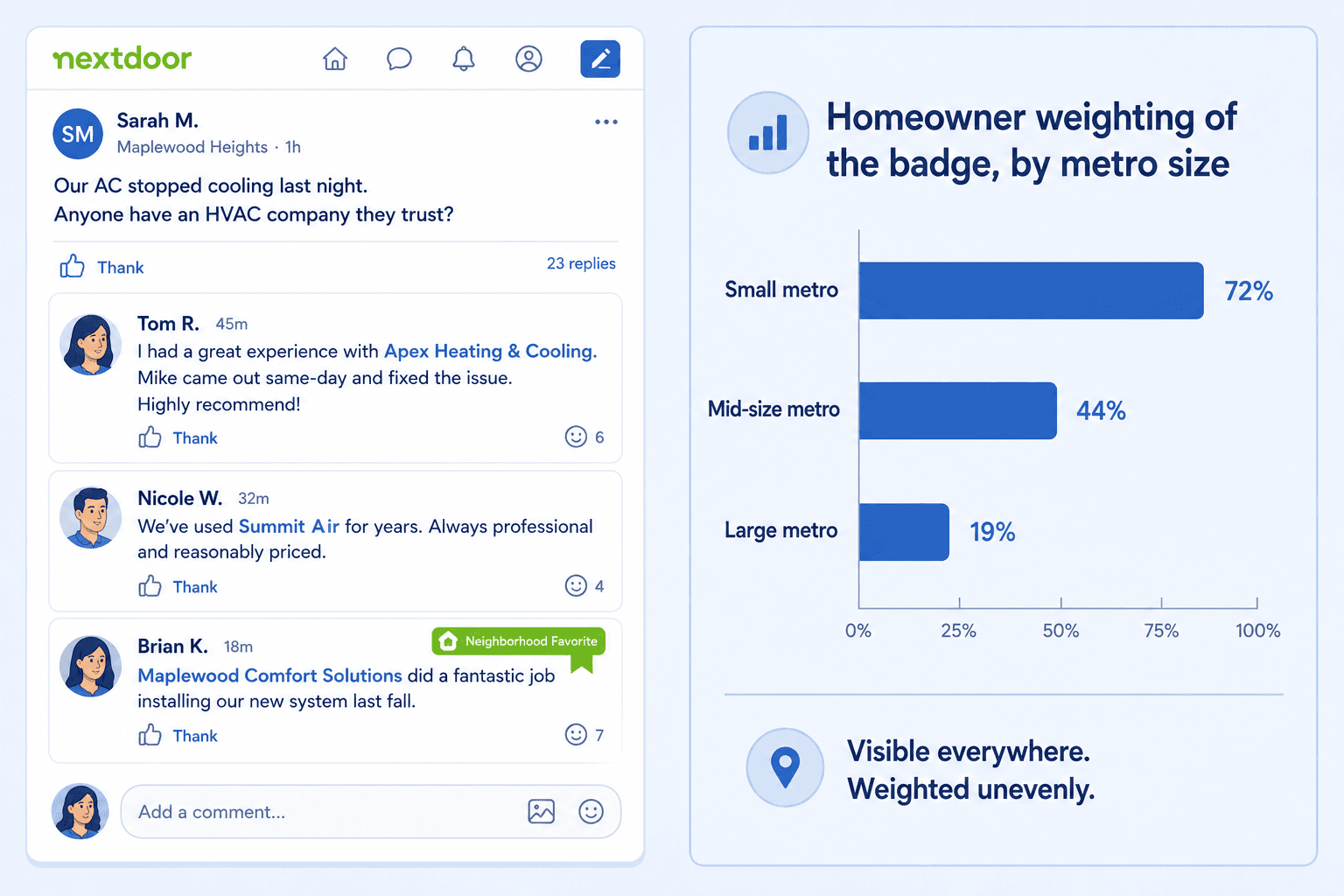
What it's worth: Mostly a lagging indicator. The badge is decided by raw recommendation count in a window, which means if you're already winning the recommendation game, the badge follows automatically. If you're not, the badge isn't the lever — getting recommended is. Chasing the badge directly (by asking customers to "rate us on Nextdoor") tends to produce thin recommendations that don't compound into real thread mentions.
In smaller metros with light competition, the badge can be genuinely visible — a homeowner browsing a business page will notice it and weight it. In larger, denser metros, it's one of many badges and gets less weight.
What to do: Don't chase the badge. Chase the recommendations. The badge will follow if you're doing the upstream work right.
Time budget: Zero direct.
The synthesis
If you're a $1M+ HVAC operator and you want to know where to put your time on Nextdoor, the answer is uncomfortable: almost none of it on the platform itself. The platform is a thin layer over the real surface, which is the conversations your past customers are having about you in front of their neighbors. Nextdoor is where those conversations happen to render; the work that decides them is everywhere else.
The right move is to claim and complete the business page, ignore the badge, run sponsored posts only as a contained experiment, and put the actual operator attention into the post-job recall mechanics that determine whether you show up in the Recommendations surface at all.
If you want to know how often you actually show up in your service area's recommendation threads — independent of how often you log into Nextdoor — request your free neighborhood report. It's a snapshot of the threads you're not seeing.